---
title: "Packages 'ggpmisc', 'ggpp' and 'gginnards'"
subtitle: "Data labels, annotations and insets for 'ggplot2'"
author: "Pedro J. Aphalo"
date: "2023-02-28"
date-modified: "2026-04-22"
bibliography: datviz-ggplot-and-friends.bib
format:
html:
code-fold: true
code-tools: true
categories: [R packages, plotting, ggpp, ggpmisc, gginnards, ggplot2]
keywords: [R, ggplot2, labels, annotations, regression, anova, correlation, fitted models, data labels, plot annotations, plot insets]
abstract: |
R packages'ggpmisc', 'ggpp' and 'gginnards' started as a single small R package some 10 years ago. In this page I briefly recount the history, describe the design aims and the most important extensions they provide to the Grammar of Graphics as implemented in package 'ggplot2'. The geoms, stats, positions, scales and numerous utility functions these three packages provide can simplify the constructions of different types of plots. 'ggpmisc' has its focus on statistical annotations, such as fitted model equations and multiple comparisons. 'ggpp' implements geoms that support various types of plot insets, annotations and marginal marks. 'gginnards' gives access to the inner components of 'gg' objects (ggplot objects) allowing their study and manipulation.
---
::: callout-note
To see the source of this document click on "</> CODE" to the right of the
page title. To expand the code "chunks" within the page, click on the triangle next to the word "code" above the plots. The page is written using [Quarto](https://quarto.org/) which is an enhanced version of [R Markdown](https://rmarkdown.rstudio.com/).
:::
## Introduction
R package 'ggpmisc' extends (enhances?) the Grammar of Graphics [@Wilkinson2005]
as implemented in package ['ggplot2'](https://ggplot2.tidyverse.org/) [@Wickham2016] (see also page ['ggplot' Basics](ggplot2-introduction.qmd) at this site).
The development of package 'ggpmisc' started in 2016. I have since then added
features and split the original 'ggpmisc' package into three packages to easy
maintenance and reduce overhead when only some functions are reused in other
packages. I have strived to make updates backwards compatible and to also track
changes in 'ggplot2' to keep the user interface of these extension packages as
consistent as possible with recent versions of 'ggplot2'.
As a researcher I use regularly these packages, and many functions and
features I have added when needed by myself, members of my research group,
collaborators, and also based on issues and pull requests in the GitHub
repository and even to answer questions that I have found interesting at
StackOverflow.
My long-term aim is to submit these packages to R Open Science for peer review.
## How do these packages extend 'ggplot2'?
### Scope
The focus of 'ggpp' is on graphical elements and their positioning, including
plot insets. The focus of 'ggpmisc' is on textual and graphical plot annotations
based on model fitting and tests of significance. The focus of 'gginnards' is
on debugging and manipulation of 'gg' objects (the plots before rendering).
### Aims
The aim of 'ggpmisc' is to make it easy the design and creation of plots containing graphical elements or features not directly supported by 'ggplot2': statistical
annotations, insets and computed position displacements. These new features are implement consistently with the Grammar of Graphics implemented in 'ggplot2' as extensions to this gramamr. In most cases, it had been already
possible to create similar or even identical plots using 'ggplot2' together with
rather complex user code.
Remaining conceptually consistent with the Grammar of Graphics as implemented
in 'ggplot2', is in other words,
finding ways of reusing as much as possible the existing grammar to solve new
problems. For example, the interface of the new layer
functions mimics as closely as possible the user interface of similar functions in
'ggplot2' while adding new features or functionality. The new layer functions for adding
graphical elements as data labels, are consistent with the layer functions
from 'ggplot2' used to add text-based data labels to plots. In
'ggpmisc' plot insets are treated as plot elements similar to text and labels
(techically _data labels_).
This is in contrast to the approach used in 'patchwork' where plots with
insets are treated as composite plots. The two approaches, in my opinion, are
complementary.
The approach I use in 'ggpmisc' is also different to that of some popular extensions
like the whole-plot constructors from 'ggpubr' or the `autoplot()` method
from 'ggplot2'. While these functions simplify plot creation by hiding from users
the grammar of graphics and returning a complete plot, such functions introduce
important constraints on the plots that can be ceated. In contrast, 'ggpmisc'
and 'ggpp' extend the grammar, retaining its flexibility.
The aim is to make available within the existing grammar features that previously
required precomputaion. Clearly, extending the grammar and replacing the grammar
with functions targetted to specific types of plots are two approaches with
different objectives and targeting different users and use cases.
::: callout-tip
# Designing data visualizations
This page concerns with using R packages 'ggplot2', 'ggpp' and 'ggpmisc' to construct data-based graphs. The design of data visualisations, including plots, plays an important role in communication. The flexibility of the Grammar of Graphics makes it possible to design plots matched to authors' intentions and different audiences.
The very important previous step of designing the graphs taking into account the intended message to be conveyed and the expected audience is not considered here, other than as a justification for the approach followed in the design of 'ggpp' and 'ggpmisc'. I recommend @Murrel2026, @Vanderplas2020 and chapter 3 in @Holmes2019 as practical introductions to this subject, and @Koponen2019 as a more comprehensive source covering historical and graphic design perspectives in addition to effective data representation. The books by @Tufte1983 and @Cleveland1985 are also useful reading.
:::
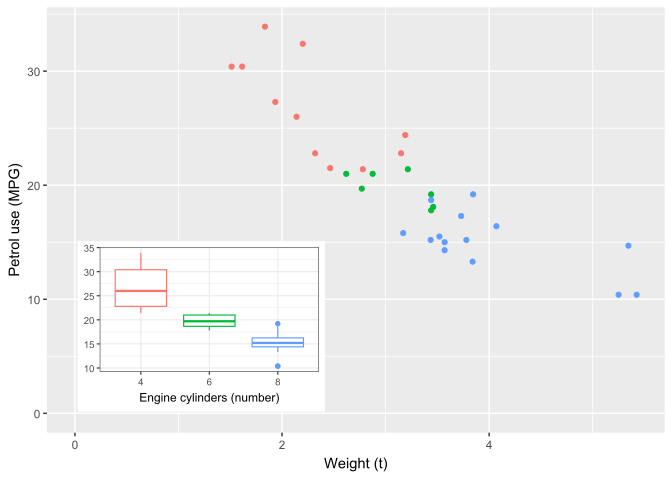
### 'ggpp' (geometries, positions, scales)
Package ['ggpp'](https://docs.r4photobiology.info/ggpp/) extends
['ggplot2'](https://ggplot2.tidyverse.org/) and the grammar of graphics to more
consistently and powerfully handle data labels, annotations and insets. New
geometries extend the grammar so that whole plots, tables and graphical objects
('grid' grobs) can be used as data labels using an almost identical syntax as
used for text labels in 'ggplot2'.
Position functions as implemented in 'ggplot2' do not preserve the original
position. This limitation was first addressed in 'ggrepel' for
`position_nudge()` to allow drawing a segment linking repulsed labels and text
to their original location. 'ggpp' implements the "keeping" of the original
position with new position functions matching all 'ggplot2' position functions.
This did not solve all limitations, as the positioning of data labels was
constrained by the fact that `ggplot2` position functions can not be combined.
So, 'ggpp' defines combined position functions that implement the usual
displacements like stacking plus nudging. **In 'ggplot2' (>= 4.0.0) some
position functions obey _aesthetic_ `nudge` if a numeric variable is mapped to it or passed as a constant value.**
Another feature of 'ggpp' is support for new types of nudging, including
computed nudging based on the local data 1D or 2D density, based on fitted
lines, or away or towards a computed centroid or arbitrary point or line. When
nudging is applied to both along _x_ and _y_, even radial nudging is supported.
Thanks to a fruitful collaboration with Kamil Slowikowski, the author of
'ggrepel', these new approaches to nudging are compatible with and extremely
effective when combined with repulsive geoms. A few convenience and utility
functions are also included.
Perhaps surprisingly, given the good design of 'ggplot2' and its support for
extensions, all these features were implemented without any overwriting of
'ggplot2' code except for a wrapper on `annotate()` to add support for NPC.
Support for NPC has been added to 'ggplot2' as well as the implementation of
aesthetics for nudging. These not yet cover all the use cases that 'ggpp'
covers.
::: callout-note
# Example 1
```{r, message=FALSE}
library(ggpp)

p <- ggplot(mtcars, aes(factor(cyl), mpg, colour = factor(cyl))) +
  stat_boxplot() +
  labs(y = NULL, x = "Engine cylinders (number)") +
  theme_bw(9) + theme(legend.position = "none")

ggplot(mtcars, aes(wt, mpg, colour = factor(cyl))) +
  geom_point(show.legend = FALSE) +
  annotate("plot", x = I(0.05), y = I(0.05), label = p,
           hjust = "inward", vjust = "inward") +
  xlab("Weight (t)") + ylab("Petrol use (MPG)") +
  expand_limits(y = 0, x = 0)
```
:::
### 'ggpmisc' (statistics)
Package ['ggpmisc'](https://docs.r4photobiology.info/ggpmisc/) makes use of
'ggpp' to add specific annotations and insets to plots. 'ggpmisc' mainly defines
stats, that help annotate plots based on the results of model fitting and tests
of significance. It also provides stats for adding fitted and predicted curves
and for highlighting and or plotting residuals. These stats either complement or
enhance `stat_smooth()` and `stat_quantile()` from 'ggplot2' adding support for
additional types of models and annotations.
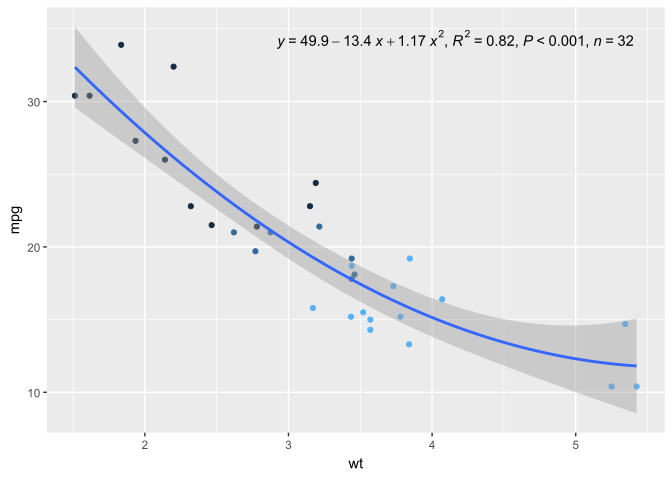
Annotations include fitted-model equations and other parameters estimates like
$R^2$, $P\mathrm{-value}$, $F\mathrm{-value}$, AIC, BIC, and $n$ for models
fitted to continuous values mapped to both _x_ and _y_ aesthetics. The labels
and fitted model equations are generated automatically in many cases, and
depending on the _geom_ using R's plotmath, $\LaTeX$, or markdown encoding or
optionally as plain text. In the case of markdown, 'ggtext', 'marquee' and
'ggrepel' (>= 0.9.7) are supported. $\LaTeX$ uses the geom from 'xdvir' and
plotmath is supported by geoms from 'ggplot2' and many of its extensions.
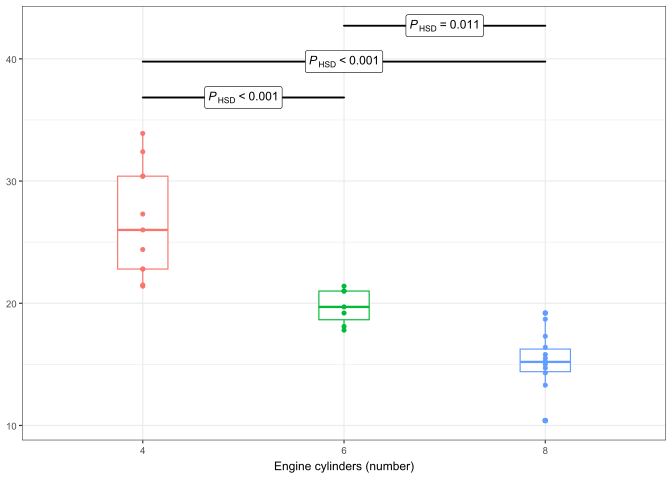
Inset ANOVA tables can be added when _x_ or _y_ is a factor. Annotations for
multiple comparisons are also implemented based on 'mulcomp' and support
arbitrary sets of pairwise comparisons and multiple _p_-adjustment methods.
Additional stats make it possible to
automatically annotate whole plots or quadrants in plots with the number of
observations, and to locate peaks or valleys, and label them with their _x_
and/or _y_ coordinates. A few convenience and utility functions are also
included.
::: callout-note
# Example 2
```{r, message=FALSE}
library(ggpmisc)
formula <- y ~ poly(x, 2, raw = TRUE)

ggplot(mtcars, aes(wt, mpg)) +
  geom_point(aes(colour = cyl), show.legend = FALSE) +
  stat_poly_line(formula = formula) +
  stat_poly_eq(use_label("eq", "R2", "P", "n"),
    formula = formula, label.x = "right")
```
:::
::: callout-note
# Example 3
```{r, message=FALSE}
library(ggpmisc)
ggplot(mtcars, aes(factor(cyl), mpg, colour = factor(cyl))) +
  stat_boxplot(width = 1/4) +
  geom_point() +
  stat_multcomp() +
  labs(y = NULL, x = "Engine cylinders (number)") +
  theme_bw(9) + theme(legend.position = "none")
```
:::
### 'gginnards' (debugging and manipulation)
Package [`gginnards`](https://docs.r4photobiology.info/gginnards) is useful for
debugging and learning about 'ggplot2'. It also implements the manipulation of
ggplot layers (insertion, deletion and moving up or down) which can be useful
not only for learning, but also for tweaking some ggplot objects returned by
"canned" functions.
### Compatibility with 'ggrepel'
Package ['ggrepel'](https://ggrepel.slowkow.com/) provides repulsive *geoms*.
These are compatible with the *stats* from 'ggpmisc' and with the *positions*
from 'ggpp'.
## What is the history of 'ggpmisc'?
### It all started with a question
About 10 years ago, Titta Kotilainen, now a research professor at Natural Resources Institute Finland (Luke) asked a simple question that went something like: "I see in
[Stackoverflow](https://stackoverflow.com/questions/7549694/add-regression-line-equation-and-r2-on-graph/)
some answers to the question of how to add a regression line equation to a
ggplot, but they are so complex... Isn't there any simpler way of doing this?" Titta had been using R and ggplot2 for some years and realized there could be a better way.
I read the answers and they were not only not straightforward to code, but
case specific. So after some thinking and "googling", a primitive version
of `stat_poly_eq()` was born and so as to share it, a new package. Lacking a
good idea of what the package would
develop into, following the trend set by 'Gmisc' and a few other R packages I
decided to use 'ggpmisc' (ggplot miscellanea). At this time I did not dare to submit it to CRAN.
One can argue about in which cases adding a fitted model equation to a plot is a good idea or just a disturbance, but some users coming from other data visualization software expected this to be a "normal" feature rather than something one needed to code from scratch. I also found myself very useful when teaching to show plots with annotations not only of fitted model equations but also other parameters from the fit.
Initially I was the main user of the home-brewed R package and Titta and a couple of other researchers the remaining ones. During this period I was quite free to modify the interface and get feedback about what features were "missing" and what things were outright bad ideas.
If I remember correctly, some time later, I decided to submit the package to CRAN mainly to make it easier for the few users of the package to install updates.
Since then, to my surprise the package has been continuously gaining users while I have kept developing it. The ideas for new features at first came mostly from my own needs and the needs of my close collaborators. In recent years, feedback through GitHub issues lead not only to adding support for additional types of statistical models, but also adding these statistical methods as tools for my own work and relevant to teaching. For much of this input I have to thank Mark Neal (Head of Data Science at DairyNZ).
From the point of view of making 'ggpmisc' and 'ggrepel' work smoothly together, the collaboration, the good will and help from 'ggrepel' author Kamil Slowikowski (Mass General Brigham, Greater Boston, USA) was crucial. Samer Mouksassi (Université de Montréal, Canada) also contributed code and important ideas.
'ggpmisc' would not have been possible had not 'ggplot2' been open source software. Much of my code uses code from 'ggplot2' as its basis, edited to do new things, but using 'ggplot2' as example and of course as the "engine" that does much of the work. 'ggplot2' provides the framework that guides and makes possible the development of R packages that extend its functionality. There are too many people to thank, from the perspective of the development of 'ggpmisc', Teun van den Brand, and Thomas Lin Pedersen have been extremely helpful, and of course Hadley Wickham and Winston Chang for making the design of 'ggplot2' extensible and striving as 'ggplot2' development progressed to easy the writing of extension packages.
### 'gginnards'
Early versions of 'ggpmisc' included some statistics and geometries that I wrote to make it easier for me to learn how 'ggplot2' works and to see if my own attempts at extending 'ggplot2' worked as intented. These layer functions were initially very simple and writing them helped me understand how statistics and geometries work.
Rather soon, it became clear to me that these tools did not belong in the same package as the rest of 'ggpmisc' as they were clearly aimed at different users and to solving a different class of problems. Splitting these layer and utility functions into a sepearte package was natural and caused no problems.
### 'ggpp'
Initially 'ggpmisc' contained both statistics and geometries called by these statistics. With time 'ggpmisc' became both too big and also new uses for the geometries, unrelated to the statistics, started to appear. A large package, from which users would use only a specific part, guided the split of the geometries previously in 'ggpmisc' into package 'ggpp'. Splitting the package was in practice very easy, as the documentation had been for some time already in two vignettes, one for the geometries and one for the statistics.
From the perspective of users the situation was more complex than with 'gginnards'. Some users would need only 'ggpp' while users of 'ggpmisc' would need both 'ggpp' and 'ggpmisc'. Making 'ggpp' a requirement of 'ggpmisc' smoothed the change for most, but not all users. Requiring 'ggpp' attaches this package, but still its objects reside in a separate namespace named 'ggpp' instead of 'ggpmisc' as before. This broke user code where the explicit reference to the namespace was used (with :: notation).
'ggpp' contained code that I wrote for 'ggpmisc', however, in 2022 Daniel Sabanés Bové wrote about their interest in including 'ggpp' as part of a toolbox (R package 'ggplot2.utils') for use in medical/pharmaceutical data analysis. This meant that the standards of quality, most specifically the unit test code coverage needed to be increased to more than 90%. To achieve this, they contributed many new unit tests to the package. This revealed some bugs which I fixed. This also improved 'ggpp' significantly and also made it relevant on its own, as at the time of writing 'ggpp' has nearly twice as many downloads per month than 'ggpmisc'.
### Was the benefit worth the effort?
Yes, without doubt. I have made myself heavy use of 'ggpp' and 'ggpmisc' when writing research papers, research talks, and in teaching. Not many plots of a given type have to be created before having put the code in a package rather than in multiple scripts pays off. It is also much easier to explain others how to create similar plots, even to close collaborators.
For a scientific manuscript to be accepted, effective communication is crucial. The more complex and larger data sets get, well-designed data visualization becomes more important. I see the development of packages as an investment, it takes additional time and effort up-front, but saves time and effort in the longer time.
The gains I described above would not have required publication of the package in CRAN or having the code open in GitHub. Publishing the package improved the quality of the package code, revealed bugs that I fixed, i.e., made the package better. Sometimes, developers complain about the strict requirements CRAN has, I don't. Some requirements may seem unreasonable at first sight, but after having more than 200 CRAN submissions accepted (each update to a package is a submission) I see why they are needed. It is also much easier both for the author and for the readers if a citation to a package published in CRAN is included in a paper rather than the code being provided as a long script as a supplement. A published package, because of the publication requirements and because of it has multiple users is less likely to contain errors than a script used only once.
What I did not expect is 'ggpmisc' to be cited in scientific publications as much as it is being cited, as of 2026-04-22, 316 citations. I do not know how much these citations count in the eyes of reviewers of grant applications or in performance evaluations. Anyway, 'ggpmisc' is on the way to soon become the most cited work from my long career in science (at least according to Google Scholar). The lifetime downloads for 'ggpmisc' from CRAN are approaching one million.
### After 10 years, and yet not at version 1.0.0?
I keep enhancing 'ggpmisc' and code coverage of tests is not yet as high as I would like it to be. Each new feature requires new test cases because it adds new code, and thus it is slow to improve tests' code coverage even if I add new tests regularly. Assessing coverage is difficult in the case of 'ggplot2' extensions as not all code is detected as code. At each release there are things left to do, mostly enhancements waiting in the queue to be implemented in the future. I have to get around, and accept that version 1.0.0 will be another link in the chain of releases, but that the code is good enough to be released as a major version. The 10th aniversary release could be numbered as version 1.0.0. 'ggpp' seems even closer to version 1.0.0.
## Maintenance
### CRAN
A research article is published once for good. Publishing software, especially an extension to software like 'ggplot2' that is not "frozen" makes it necessary to update 'ggpmisc' and 'ggpp' from time to time. Because of CRAN's requirements and the willingness to help from 'ggplot2' developers, keeping things working has not been a problem. In this units tests in 'ggpp' and 'ggpmisc' play a crucial role as they reveal any incompatilities with upcoming updates to 'ggplot2', making them visible both to me and the maintainers of 'ggplot2' before updates are released. So, code breaking by 'ggplot2' updates is at most a very minor nuisance.
Most updates, but specially major updates, like the recent 'ggplot2' 4.0.0, bring new features and non-code breaking changes that are anyway very useful or create inconsistencies in features that would be good to incorporate to 'ggpp' and 'ggpmisc'. Packages that are too large are inconvenient to use, specially in other packages. On the other hand, maintaining a package has some overhead so maintaing too many different packages becomes very time consuming. I try limit future enhancements to 'ggpmisc' to the current statistics. However, I may change my mind.
### How is the code tested?
The release of package 'testthat' made testing R code producing numerical or
textual output rather easy, but testing graphical output remained very difficult
until `vdiffr` was released. Developing and maintaining 'ggpmisc' and publishing
it through CRAN would not have been manageable without using unit tests
implemented with 'testthat' and 'vdiffr'.
Unit tests for 'ggplot2' extensions had been quite tricky to implement, causing
in the past trouble for CRAN and breaking frequently due to inconsequential
changes in 'ggplot2' or its dependencies. For this reason, even though I
implemented the first unit tests for 'ggpmisc' in 2017 and kept adding more
since then, I initially kept these tests local without including them in the
package releases.
In early 2023 I checked CRAN landing pages for the packages: 'ggpmisc' had 10
reverse dependencies and two reverse suggests, 'ggpp' had five reverse
dependencies and one reverse suggest, and to my surprise, even 'gginnards' had
two reverse dependencies.
In 2023 quality control of 'ggpp' was enhanced by addition of many new
unit-tests to increase code coverage to the level required for
accreditation/certification. Daniel Sabanes Bové and his team took the
initiative and provided a lot of help. Testing is nowadays frequently assessed
as code coverage. In addition, I have strived to have good coverage of possible
input values in data. Code coverage of 'ggpp' has remained above 90%. In 2026
code coverage in 'ggpmisc' has not yet reached 90% but keeps improving.
Currently, continuous integration actions run CRAN checks in GitHub after each
code commit and before pull requests are merged. This ensures that the _main_
code branch in the git repository remains free from major bugs. I still use
CRAN's winbuilder before submitting updates to CRAN.
My goal is to follow the [recommendations of
ROpenScience](https://devguide.ropensci.org/index.html) and once requirements
are met, submit 'ggpp' and 'ggpmisc' to their peer review system.
## More information on 'ggplot2' and the packages
The documentation, as websites, including the output from examples and all
vignettes is available for ['ggpp'](https://docs.r4photobiology.info/ggpp/),
['ggpmisc'](https://docs.r4photobiology.info/ggpmisc/) and
['gginnards'](https://docs.r4photobiology.info/gginnards/).
At this web site there are also [galleries](../galleries.html) of plot examples
with the corresponding R code, organized by type of plot or plot features.
Chapter 9 in @Aphalo2024 provides an introduction to 'ggplot2', 'ggpp', and 'ggpmisc'. The books by @Wickham2016 and @Chang2018 describe 'ggplot2' in detail and provide plotting recipes, respectively. @Murrel2026 discusses the design principles for data visualizations and @Murrell2021 delves in detail into R graphics systems including 'ggplot2'.